Wednesday, August 12, 2009

The Peace Wall

Just a quick post about an idea I had in my last Humanities workshop. I think it would be great to have a Peace Wall display in the classroom based on an activity introduced to us in class; Peace and the 5 Senses.

Peace looks like.....
Peace sounds like.....
Peace tastes like......
Peace smells like.....
Peace feels like.....

The Peace and the 5 Senses passage would be the centerpiece of the display wall and students would post up pictures and words or phrases relevant to their own interpretation of what peace means to them.

Another theme wall could be the Team Spirit wall. I think its of absolute importance to establish a learning environment based on respect and compassion. The Team Spirit wall may represent thoughts on how students themselves wish to be treated. Key words may include: respect, trust, encouragement, support, unity, understanding, forgiveness and friendship.

Humanitites: Global Education Project- Online Resources

United Nations Cyberschool Bus : Great teacher resource for introducing and exploring world issues. Issues are broken down into curriculum topics (specified for age groups) which include peace, poverty, human rights, cleaner oceans and saving tomorrows world. There is also a quizzes and games section.

http://www.un.org/Pubs/CyberSchoolBus/

Oxfam Education Website: Free online teaching resources in which you can browse by age, resource type, curriculum area or country. Some resource areas found in the 7-11 age group include: Bring on the World, Bullying, Children's Rights, Climate Chaos and Global Citizenship in the Whole School.

http://www.oxfam.org.uk/education/resources/

The Free Rice Website: This website would serve as a great homepage for school computers. It is a simple action tool for students wanting to help. Warning though.....it is addictive, but in the best way. For every correct answer, 10 grains of rice are donated through the UN World Food Program to help end hunger. Teachers can even specify the subject matter and level of questions.

http://www.freerice.com/index.php


Free The Children Website: Free the Children is the worlds largest network of children helping children through education. It was founded by Craig Kielburger in 1995, when at twelve years old he got his friends together to begin fighting child labour. It serves as the perfect example for how children can make a difference in the world. The website has many great resources aimed at educating children about what they can do to help.

http://www.freethechildren.com/

Friday, August 7, 2009

ICT Workshop 2 : Educational online games (QUIA)

In the second half of Workshop 2 we looked at online quizzes and activities that may be used in classrooms. We were introduced to the Quia website, which allows users to create their own customised online quizzes and activities.


1) Online Quiz
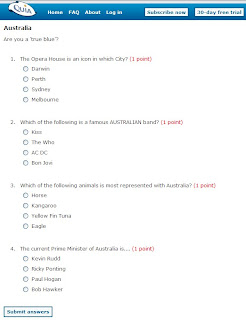
http://www.quia.com/quiz/1882694.html
The quiz I created was titled 'Are you a true blue?' and was based on facts relating to Australia. The design process was quite straightforward and the program very user friendly. After giving the quiz a title and description, I specified how many questions, how many answer choices and obviously the correct answer. The program also allows you to specify how many points each question is worth.

2) Online Activity - Battleship
http://www.quia.com/ba/312179.html
The Battleship activity I created had an Australian sport theme. The process was the same as the one used in creating the quiz, however here the program incorporates a battleship game in delivering the multiple choice questions. Each question represents a block of the enemy ship that can only be destroyed if the answer is correct. The aim of the activity is to destroy all the enemy ships.
The Quia program allows a teacher to create and customise online activities according to subject matter and level within a safe and controlled online environment. A motivating factor in using this type of teaching method is that students may be more engaged when participating in activities they perceive as fun. As such, using activities like hangman and battleship may be particularly effective with students who have behavioural issues or trouble concentrating.

I think the program is best applied however when students create their own online content. For example, the program may be incorporated into a maths lesson as follows:
1) Each student is given a different maths topic (fractions, multiplication, addition, percentages....) and asked to create a quiz/activity on that topic.
2) Teacher checks to ensure material is correct and loads up the activity ready to use.
3) Students swap computers and complete each others activities.

The process of designing a quiz/activity is a more effective means of having student revise topic material and also supports their creativity. Having them come up with their own questions encourages a deeper level of thinking and the prospect of having others complete their activity is added motivation.

One important consideration with any computer based activity relates to resources available in the classroom. With limited computers available, a teacher may set time intervals for students to create their own quiz/activity throughout the day. Students may also be asked to work in groups.

Thursday, August 6, 2009

ICT Workshop 2 - Design Process: Make a frog jump!!

In the first part of this weeks workshop we explored the technology design process. It must be clarified that the ICT process is not isolated to computerised technology. It may also relate to designing and producing a technological system using everyday materials, as in this activity. When incorporating activities of design in the classroom, it is important to facilitate the thought process involved by ensuring students record ideas, encountered problems and reflections. Below is an example a design brief (as used in the workshop) :

As shown, the design brief represents the different dimensions of the Victorian Essential Learning Standards for design, creativity and technology; Investigating/designing, producing and analysing/evaluating.

Now, before I elaborate on application of the design brief, the task we were assigned in the workshop went as follows; with a partner, design a frog that jumps using the materials provided - an elastic band, a strip of cardboard, a cut out of a frog, sticky tape and scissors. The first step was to consider the problem at hand and write down some possible design solutions. For example, was the jumping mechanism going to be connected to frog or was a catapult like device more appropriate. All these ideas formed part of the investigate/design section of the brief.
We decided upon a catapult device and after a quick discussion on how the law of resistance works, went about creating our jumping tool. Trial and error was a key element of our design phase and key features of our mechanism were recorded in the produce section of the design brief. These included using a brace in the middle of the cardboard to make it 'flick' and ensuring the frog was slightly weighted. As a class, we each gave a demonstration of our completed jumping frogs and reflected on the design process. An example of a possible design is shown below. By pulling back on the cardboard (stretching the elastic out), placing the weighted frog on the tip and releasing, the goal is achieved...the frog jumps!


From this...

To this....

So what are the merits of the activity in an educational sense? The focus here I think is on creative learning. By giving students materials and a specific goal to achieve, the design process is directed towards their imaginative mind. Though they may draw upon past experiences or even take note of what others are doing, primarily they must rely on their own analysis of the problem at hand. It's important to ensure the problem presented to students is practical and is something they can relate to. For example, children will interpret 'make the frog jump' much easier than 'design a mechanism that can leave the ground'. Also, to encourage their analytical and creative abilities it is imperitive to have students record their ideas by either writing them down or representing them in a drawing. From this they can visualise their thought process and later reflect on it.

In presenting an activity like 'the jumping frog' to a class I would be sure to introduce the concept of trial and error in the design process. I think its important that students are aware that there may be many different solutions to the problem at hand, and trial and error is a way of determining which is the best. Thus an extension of the activity may be to have students produce two different design mechanisms for the same problem and then reflect on which is more effective and why.

Wednesday, August 5, 2009

Maths Workshop Activity : Listen in cards

In yesterday's Maths workshop we looked into how to get children thinking mathematically and were introduced to an activity involving 'listen in cards'. With this activity, each student is given a card that identifies their number as well as a question that leads on to the next number in the sequence. The cards are prepared in such a way that every student must read their number and ask their question in order to complete the sequence. For example, in a group of 6 students:

Student 1: I am 2. Who is 3 more than me?
Student 2: I am 5. Who is 4 more than me?
Student 3: I am 9. Who is 1 less than me?
Student 4: I am 8. Who is half of me?
Student 5: I am 4. Who is 2 more than me?
Student 6: I am 6. Who is 4 less than me?

The mental calculation required by students as they follow the sequence is a great example of 'thinking mathematically'. As such, the activity may be effectivley used at the beginning of a Maths session as a lead in to a more focused topic. The activity can be adjusted to suit a wide range of learning levels and can incorporate different dimensions of mathematical calculations (eg. percentages and fractions). When facilitating an activity like this I think teachers must be aware that certain students may experience 'maths anxiety' when put on the spot. Thus, an encouraging enviornment must be set and support provided when needed.

Tuesday, August 4, 2009

Internet risks and student protection online

I think it's integral when incorporating ICT in the classroom to ensure students have a fundamental understanding of associated risks involved, particularly when working online. These include:

1) Harassment on the Web- Children may experience bullying through email and chat messages.

2) Viruses and hackers- Without the strong protection systems in place, data of a personal or delicate nature may be retrieved without the users consent.

3) Financial risk- Children may be tricked into providing a parents credit card information.

4) Exposure of explicit and harmful material: Children may come across or be lead into sites of a pornographic, violent or offensive nature.

5) Revealing private information: Children may be enticed into filling out online forms and providing information such as email/postal addresses and contact numbers that may be abused in various ways.

As well ensuring computer systems used in classrooms are protected using filters and anti-virus software, the teacher's role in facilitating ICT activities and monitoring students working online is integral. The following two websites may be used in educating students on how to behave online and the risks involved:

CyberSmart: A government website that provides links to online education activities for various age groups. Once you specify the age group, click on 'fun things to do'. Resources include a quiz that analyses how 'cybersmart' the student is and an interactive informative feature (CyberQuoll for kids and CyberNetrix for teens).

http://www.cybersmart.gov.au/

Netty's World: A website aimed at children between 2-7 designed to educate how to be safe when using the internet. It provides an interactive environment as students progress through 'Netty's Net Adventure' relaying important internet saftey messages along the way.

http://www.nettysworld.com.au/

Monday, August 3, 2009

English Workshop: Speaking and Listening Activities

I'm going to try and maintain a log of practical workshop activities that I may draw upon for classroom ideas in the future. Today in our English workshop we went through a few activities aimed at improving a student's speaking and listening abilities. Our lesson revolved around the central idea that spoken language is the base for building literacy. In groups we actively participated in chain storytelling and a scenario activity called 'what good luck / what bad luck.' As with any classroom activity, it is important to first clearly outline how the activity works and its purpose. In this case students are looking at the importance of focused listening, and oral creative expression.

1) Chain storytelling : In groups of 2-4 children take a turn each in verbally adding one line to the story. The teacher may first read a story to the class and have them recollect the story, the students may recollect a common fairytale they already know, or they may take a turn each at constructing their own story.

2) What good luck / What bad luck : In groups of 2-4 children take a turn each in adding to the story, starting each phrase with 'What good luck....' and then 'What bad luck...' For example:

Student 1 - What good luck, today was Sam's birthday.
Student 2 - What bad luck, Sam woke up with an awful cold.
Student 3 - What good luck, when Sam saw his enormous present he felt much better..and so on.

In facilitating the exercise teachers may encourage students to include adjectives and use expression when speaking. The importance of eye contact when listening may also be touched upon. A group discussion may follow each activity allowing students to express their ideas and any difficulties they may have faced.